SIM Card vs. Pocket WiFi: The Ultimate Korea Internet Guide (2025)

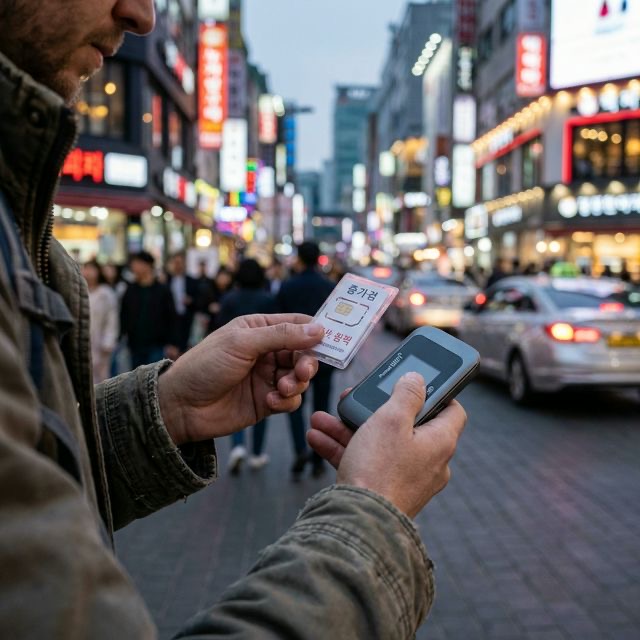
You land at Incheon International Airport. You’ve just spent 10+ hours in the air, you’re tired, and you want to message your family or navigate to your hotel in Myeongdong. You turn off airplane mode, and your home carrier sends that dreaded text: "Welcome to Korea! Roaming data is $10 per day."
Stop right there.
South Korea has some of the fastest and most affordable mobile internet in the world. For the price of just one or two days of roaming, you can secure an entire week of unlimited 5G data. However, the landscape has changed significantly in 2025 and 2026. Between the rise of travel-specific eSIMs and major updates to local apps like CatchTable, choosing the right connection is no longer just about "getting online"—it's about how you intend to experience the country.
Should you go digital with an eSIM, stick to a physical chip, or rent a "WiFi Egg" for your group? This guide breaks down the costs, technology, and hidden tricks for 2025-2026.
1. The 2025 Quick Verdict: Which Connectivity Profile Are You?
Before we dive into the technical specs, let's look at your travel style.
| You are... | Recommended Option | Estimated Cost (Daily) |
|---|---|---|
| The Solo Digital Nomad | eSIM | $2.50 – $4.00 |
| The Hardcore Foodie | Physical SIM (with 010 Number) | $3.50 – $5.00 |
| The Family / Squad (3+ people) | Pocket WiFi (WiFi Egg) | $3.00 (Total) |
| The Laptop/Tablet User | Pocket WiFi | $3.00 (Total) |
2. eSIM: The Modern Gold Standard
In 2025, eSIMs (Embedded SIMs) have become the default for most travelers. If you own an iPhone 11 or newer, or a recent Samsung Galaxy/Pixel, your phone is likely compatible.
Why Choose eSIM?
- Zero Physical Hassle: You don't need to find a SIM card tool or worry about losing your tiny home SIM card.
- Dual Connectivity: You can keep your primary home number active for emergency calls or 2FA (Two-Factor Authentication) texts while using the Korean eSIM for all your data needs.
- Instant Activation: You can buy your plan while waiting at your gate in London or LA, scan a QR code, and have 5G data the second your plane touches down in Seoul.
The "CatchTable Global" Update
For years, the biggest argument against data-only eSIMs was that they didn't come with a Korean phone number (starting with 010). Tourists needed that number to use CatchTable (for restaurant reservations) or KakaoTaxi.
As of 2025, this has changed. The CatchTable Global app now allows international users to sign up using email or social logins (Google/Apple) and supports international credit cards. While a local number is still a "nice-to-have" for specific delivery apps (like Baemin), it is no longer strictly necessary for 90% of tourist needs.
3. Physical SIM: Old School Power for Long Stays
While eSIMs are gaining ground, physical SIM cards remain a powerhouse for specific use cases, particularly for those staying in Korea for 30 days or longer.
The Identity Advantage
If you are coming to Korea for work, study, or a "Digital Nomad" visa stay, a physical SIM is often the only way to get a Verified Korean Number. This is different from a tourist "voice/text" number. A verified number is linked to your passport (and eventually your ARC - Alien Registration Card), allowing you to use services like:
- Coupang & Coupang Eats: Premium delivery services.
- Naver Pay / Kakao Pay: Local digital wallets.
- Domestic Banking: Essential for long-term stays.
Where to Buy a Physical SIM
- Airport Vending Machines: Located near the luggage carousels in Incheon T1 and T2. Quick, but usually 3/5/7-day plans only.
- Convenience Stores (CU/GS25): You can buy "Korea SIM" or "Link Korea" kits. You will need to upload a photo of your passport to a web portal to activate it.
- Official Carrier Counters (SKT/KT/LG U+): The staff will handle the activation for you. This is the most reliable "plug-and-play" option.
4. Pocket WiFi (WiFi Egg): The Collective Hero
The "WiFi Egg" is a small, battery-powered router that creates a private WiFi bubble around you.
Best for Families and Groups
If you are traveling as a family of four, buying four SIM cards can quickly add up to $150+. A single Pocket WiFi device can be rented for as little as $3 per day and shared by up to 5 devices.
The Realities of the "Egg"
- The Group Tether: You must stay within roughly 10-15 meters of the person carrying the device. If the group splits up in a department store, half of you will be offline.
- Battery Management: Modern eggs last about 8-10 hours. If you are a power user navigating with Naver Maps all day, you will need a portable power bank to keep the egg alive until dinner.
- The Departure Trap: You must return the device at the airport before you check in. If you forget and fly home with it, you will be hit with a "Replacement Fee" that can reach $200.
5. Public WiFi: Is it Really Everywhere?
You may have heard that "Seoul has free WiFi everywhere." While technically true, there are caveats that travelers should know about.
The SSIDs to Look For
- Seoul_Free_WiFi: The official city network.
- Public WiFi Free: The national government initiative.
- T wifi zone / kt WiFi: Carrier-specific hotspots.
The Frustration Factor
Public WiFi in Korea is fantastic for checking a quick map at a bus stop, but it is not a replacement for a personal data plan.
- Limited Range: Once you walk 20 meters away from the source, the signal drops.
- Security: These are open networks. We do not recommend using them for banking or sensitive logins without a VPN.
- Authentication: Many "free" hotspots require you to watch an ad or enter basic information every 30-60 minutes to stay connected.
Pro Tip: If you have an SKT or KT SIM card, your phone will automatically connect to their "Premium WiFi" hotspots in subways and malls, which are much faster than the public alternatives.
6. Detailed Comparison: Carrier Wars (2025 Edition)
In Korea, three giants rule the airwaves: SK Telecom (SKT), KT (Olleh), and LG U+.
| Feature | SK Telecom (SKT) | KT (Olleh) | LG U+ |
|---|---|---|---|
| Signal Depth | Unbeatable (Best in rural areas/mountains) | Excellent (Strongest in subways) | Great (Best urban indoor consistency) |
| Tourist Support | High (Multi-language apps/support) | High (Longest history with tourists) | Medium (Focuses on budget/MVNO) |
| 5G Speed | Fastest Peak Speeds | Most Stable | Best Value |
The Truth about MVNOs
You will see brands like Chingu Mobile, Woori Mobile, or Trazy SIM. These are MVNOs (Mobile Virtual Network Operators). They use the big three's towers but sell the service at a lower price.
- Verdict: For a 1-2 week trip, MVNOs are excellent. The speed difference is negligible for social media and maps.
7. Troubleshooting & Setup Tips
APN Settings: The #1 Reason SIMs "Don't Work"
Sometimes, you insert a SIM and see "No Service." Usually, this is because your phone didn't automatically update its Access Point Name (APN).
- Solution: Every SIM kit comes with a small instruction manual. Look for the "APN Settings" section. You may need to manually type in a string like
lte.sktelecom.comin your cellular settings.
Checking Device Lock
Before you leave your home country, call your provider or check your settings (Settings > General > About > Carrier Lock on iPhone) to be 100% sure your phone is Unlocked. A locked phone cannot accept a Korean SIM or eSIM.
2026 Price Comparison: All Options Side-by-Side
Updated pricing for the most popular options available to international travelers in Korea:
| Option | Where to Buy | Duration | Data | Korean Number? | Approx. Cost |
|---|---|---|---|---|---|
| Airalo eSIM (Korea) | Airalo app | 7 days | 3 GB | No | ~$8 USD |
| Airalo eSIM (Korea) | Airalo app | 30 days | 20 GB | No | ~$28 USD |
| Klook Korea SIM | Klook app (pickup airport) | 10 days | Unlimited | No (data only) | ~$18 USD |
| SKT Tourist SIM | Airport counter/convenience store | 7 days | Unlimited | Limited voice | ~$23 USD |
| KT Tourist SIM | Airport counter | 10 days | Unlimited | No | ~$20 USD |
| Pocket WiFi (Wibee) | Airport pickup counter | Per day | Unlimited shared | No | ~$4 USD/day |
| Home carrier roaming | Auto-activated | Per day | 0.5–1 GB/day | Yes (home number) | $10–15 USD/day |
Bottom line: Home carrier roaming is never the right choice unless it's an emergency. Even a 1-week Airalo eSIM at $8 is cheaper than a single day of most home carrier roaming plans.
Step-by-Step Setup Guide
Setting Up an eSIM (iPhone)
- Purchase the eSIM plan from Airalo, Klook, or your provider's app before departure
- Go to Settings → Cellular → Add eSIM
- Scan the QR code provided in your confirmation email
- When prompted, set the eSIM as your "Travel" line and your home SIM as "Primary" (for calls/texts only)
- Enable Data Roaming on the eSIM line only
- Disable Data Roaming on the home SIM line
- Verify: You should see two signal bars in the status bar at the top of your screen
Common issue: "eSIM activation failed" — this sometimes happens if your phone was recently updated. Restart your phone and try scanning the QR code again. If still failing, contact the provider's support chat (most have 24/7 support).
Setting Up a Physical SIM (All phones)
- Power off your phone
- Use the SIM eject tool (or an unfolded paperclip) to open the SIM tray
- Remove your home SIM and store it safely in its original holder or a small envelope
- Insert the Korean SIM
- Power on; follow the on-screen APN setup instructions from the included card
- Test: Open maps, browse a website
If no signal: Go to Settings → Cellular (or Mobile Data) → Cellular Data Network and manually enter the APN provided on the SIM instruction sheet (e.g., internet.olleh.com for KT, lte.sktelecom.com for SKT).
Frequently Asked Questions
Will my phone work in Korea? South Korea uses GSM 4G LTE and 5G bands. The vast majority of modern smartphones (any iPhone from 2017+, Samsung Galaxy S8+, Pixel 3+) are fully compatible. The only phones that may have issues are older CDMA-only devices (some US carrier-locked phones from 2015 or earlier). When in doubt, check your phone's supported frequency bands against the bands listed on your SIM provider's website.
Do I need to buy the SIM before leaving my home country? No — SIMs and eSIMs are available at Incheon International Airport immediately after landing (before customs, at airport convenience stores, and at carrier counters in arrivals). However, buying an eSIM before departure means you have data the moment you land, which is useful for navigation and communication immediately after a long flight.
What is the best option for a 14-day trip with two people? Two individual eSIMs (one each) from Airalo (~$16 USD total for 7 days each, or a 14-day plan at ~$20 each). Each person has their own independent data connection, which removes the "group tether" problem of Pocket WiFi. This is almost always cheaper than two physical SIMs when you factor in the convenience premium.
Will streaming work on a tourist SIM? Yes. Most tourist SIMs marketed as "unlimited" are genuinely unlimited for standard usage including streaming, video calls, and Naver Maps navigation. Some have Fair Use policies that throttle speeds after 1–2 GB of usage per day — check the fine print. SKT and KT tourist SIMs generally maintain full LTE speeds throughout the plan duration.
Do I need a VPN in Korea? Korea has no blanket content restrictions like China's Great Firewall. All major international platforms (Google, YouTube, Instagram, WhatsApp, etc.) work without a VPN. A VPN is useful for standard security reasons on public Wi-Fi, and some streaming services may want a VPN to access your home library. For regular travel use, a VPN is optional, not required.
What if I lose my SIM or the Pocket WiFi device? For SIM cards: most are replaceable at carrier stores in major cities. Have your passport and original purchase receipt. Replacement fees vary by carrier (typically 5,000–10,000 KRW). For Pocket WiFi devices: report the loss immediately to the rental company — most have 24/7 support numbers printed on the device or rental agreement. The replacement fee for a lost WiFi Egg can range from ₩50,000 to ₩200,000 depending on the rental company's policy.
2026 Pro Tip: The Dual-SIM Combo Strategy
For travelers staying two weeks or longer, the optimal 2026 setup is a dual-SIM approach: activate an eSIM for unlimited data, then purchase a prepaid physical SIM specifically for a Korean 010 number. Total cost runs approximately ₩35,000–₩45,000 (around $27–35 USD), and the combination unlocks every app and service that requires a local number — Baemin deliveries, KakaoTaxi priority queues, and domestic-only promotions on Coupang. Short-stay visitors rarely need this, but it's the power-user configuration for longer trips.
8. Regional Coverage: Seoul vs. Remote Areas
One question we often get is: “Will my SIM work if I go hiking in Seoraksan or visit a remote island like Ulleungdo?”
In 2026, the answer is a resounding yes. South Korea has one of the highest 5G densities in the world.
- Seoul & Busan: Expect blistering 5G speeds (up to 500Mbps+) almost everywhere, including deep inside the subway tunnels.
- Jeju Island: Coastal roads and major tourist sites (like Seongsan Ilchulbong) have perfect 4G/5G coverage. Even on Hallasan mountain trails, you will likely have enough signal to post a story or call for help.
- National Parks: Major trails in Seoraksan and Jirisan are equipped with signal repeaters. However, in deep valleys or during heavy snowstorms, signal strength can fluctuate.
- Remote Islands: Even on small islands, SKT and KT typically maintain reliable 4G service for the local residents and fishing communities.
9. 2026 Customer Support: What if Something Goes Wrong?
If your data stops working at 2:00 AM on a Saturday, you have options:
- 120 Dasan Call Center: Dial 120 (or +82-2-120 from a foreign phone) for the Seoul Government’s multi-language help line. They can help translate between you and a local carrier if there's a serious misunderstanding.
- Klook/Airalo In-App Chat: Both platforms have improved their 2026 support response times, typically responding within 15 minutes for connectivity issues.
- Airport Help Desks: If you are still at the airport, head back to the carrier counter where you bought the SIM. They are used to fixing "User Error" settings on various global phone models.
Final Strategy: How to Choose?
- If you are 1–2 people staying for less than 14 days: Get an eSIM from Airalo or Klook. Use CatchTable Global for restaurant reservations. Use Naver Map (works with guest accounts) for navigation.
- If you are a solo traveler staying >30 days: Get a Physical SIM at an official carrier store in the city (Myeongdong SKT or KT stores have English-speaking staff) to ensure you get a verified number.
- If you are a family of 3+: Go for the Pocket WiFi rental and bring a power bank. Each additional eSIM saves you the tether problem, though — consider eSIMs if group members frequently split up.
Korea's internet infrastructure is genuinely world-class — 5G coverage reaches rural mountain trails and island coastlines that would be dead zones in most countries. Whatever option you choose, you will have reliable, fast connectivity throughout your trip. The decision between eSIM, physical SIM, and Pocket WiFi comes down primarily to group size and length of stay rather than any meaningful quality difference between options.
Securing your connection is just the first step of your prep. Make sure you don't miss other legal requirements — our Ultimate K-ETA Guide covers the latest 2026 entry rules. Once you're online, download our top essential apps for traveling Korea and start planning your route with our 10-Day Essential Itinerary. Ready for a deep dive into Korean culture? Check out our guide to Cultural Etiquette in South Korea.